Smart Actions
Our goal with Smart Actions for OpenPages is simple - massively improved productivity for clients when they design, build and operate an IBM OpenPages GRC solution in their firms.
- Design – Extend OpenPages with configurable capabilities the platform doesn’t natively provide, giving clients a broader toolkit to meet end-user requirements. For example, Smart Actions enables workflow-configured object moves - no custom Java required.
- Build – Reduce or eliminate custom code, cutting delivery time and dependency on scarce Java skills. Clients report requirements estimated at 4–6 weeks of Java development implemented via Smart Actions configuration in under a day. Importantly, this radically accelerates Proof of Concepts: we’ve seen end-to-end, functionally complete solutions delivered in hours, not weeks.
- Operate – Enable administrators to respond quickly to changing business demands. One client executed a complex re-organisation by scripting moves and data changes in a single Smart Actions spreadsheet—tested from Dev through Pre-Prod, then deployed to Production. Compared with multiple OpenPages tools and manual re-entry per run, this approach is faster, repeatable, and significantly reduces the risk of execution errors.
What is a Smart Action
A Smart Action implements a discrete command or operation on OpenPages.
For example, there is a Smart Action to Update any OpenPages data record, another to Copy a record and one to send a user an Email and so on.
The power of Smart Actions lies in the ability to easily compose together many Smart Actions commands to be executed - each one with a separate set of data to operate on.
Smart Action commands can be configured individually on a Schedule / Workflow Operation, be provided in an Excel spreadsheet or for more complex requirements a Cognos Report can generate the list of Smart Actions to run - and can implementing any business rules that are required. The OpenPages Scheduler or Workflow system is used to determine when the Smart Actions should be executed.
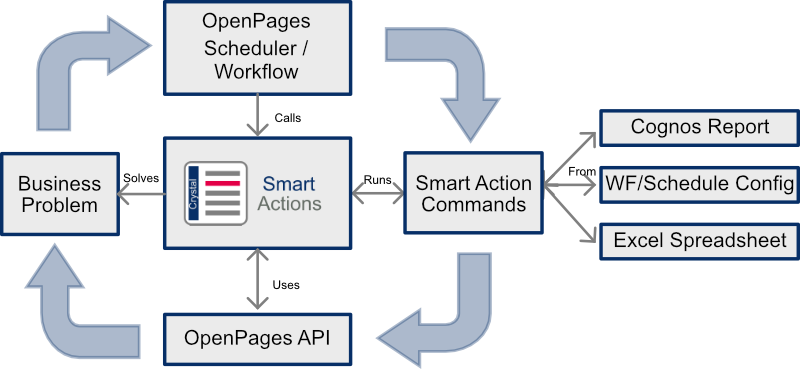
For example, a Cognos Report might return a list of ‘Copy Record’ Smart Action commands, one for every in-scope for RCSA business entity for which a Library Risk is not already present in that business. Running this nightly would ensure every in-scope business always has every Library Risk in the RCSA.
Another example, would be a Cognos report returning a list of ‘Hard Delete Record’ Smart Action commands, one for every piece of data that is outside the firms data retention policies. Running this nightly would ensure that data retention policies are enforced, with data not just deleted but entirely scrubbed from the database.
For the full list of Smart Actions commands available in the current release please click here.
How it works
- An administrator/configurator defines the required behaviour as a sequence of Smart Action commands.
- Commands are attached to a trigger (Scheduled Task or Workflow Action) or stored in a spreadsheet for repeatable execution.
- When the trigger runs, OpenPages invokes the Smart Actions Engine.
- The engine validates and executes each command in order, applying updates to OpenPages objects and data.
- For data-driven scenarios, a Cognos report can first generate the command list based on the current state of the data, and the engine then executes the resulting commands.
Benefits of using Smart Actions
- Configuration first: deliver new behaviours through configuration wherever possible, not code.
- Minimise custom Java: reduce build cost, lead time, and long-term dependency on specialist skills.
- Composable automation: script and orchestrate both native OpenPages capabilities and gap-fill actions into end-to-end processes.
- Repeatable and environment-safe: make changes portable so they can be tested in Dev/Test/Pre-Prod and promoted to Production consistently.
- Admin-operated: enable administrators to implement and run processes quickly without relying on development cycles.
- Accuracy by design: reduce manual touch points and re-keying to lower operational risk and execution errors.
Get in touch for a demonstration and a discussion on how Smart Actions could help you.